Elevate Your Bakery Business: The Minimalistic Cookie Order Form
In the world of custom baking, the details matter. From the perfectly piped icing on a sugar cookie to the presentation of the final product, every touchpoint shapes your customer's experience. Yet, one of the most critical touchpoints—the order form—is often an afterthought. A cluttered, confusing, or unprofessional form can create friction and detract from the beautiful work you do. This is where a tool like the Cookie Order Form Minimalistic template becomes invaluable. It’s not just a document; it’s a foundational piece of your brand identity, designed to streamline your workflow and project an image of calm, competent professionalism.
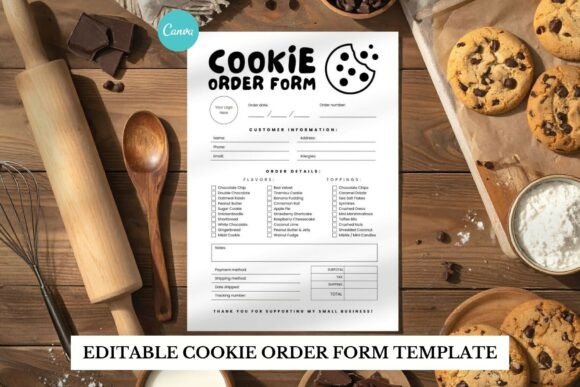
This particular Canva template is built on a philosophy of "less is more." Its black and white palette is a deliberate choice, offering a timeless, versatile foundation that works for any bakery brand. The visual personality is clean, modern, and sophisticated. It relies on generous white space, a clear typographic hierarchy, and structured fields to guide the customer's eye effortlessly. There's no visual noise competing for attention—just the essential information, presented with elegance. This minimalist style has a broad appeal, conveying trust and clarity. It suggests that your business is organized, detail-oriented, and values quality in every aspect of its operation.
Practical Applications for the Modern Baker
The true value of a well-designed design asset lies in its versatility. This template's clean aesthetic makes it suitable for a wide range of projects beyond a simple intake sheet. Think of it as a core component of your packaging design system. Printed on quality card stock, it becomes a beautiful customer care card, a gift message insert, or a receipt that reinforces your brand's premium feel. For printable sellers, it can be adapted into a cohesive set of inserts for your own product packaging, adding a professional layer to your unboxing experience.
Digital applications are just as powerful. As a web design element, a simplified version of the form could inspire a clean checkout page or a contact form on your site. For social media graphics, the template's layout can be adapted to create stylish "How to Order" highlights, promotional posts for custom cookie sets, or even Instagram story question boxes that maintain your brand's visual consistency. Its strength is in creating a unified system. Using this form alongside similarly styled invoices, thank-you notes, and social content builds a strong, recognizable brand identity that customers will remember.
How This Template Influences Your Brand Perception
A minimalist font and layout do more than look nice; they actively shape how your business is perceived. The clear visual hierarchy—achieved through thoughtful font pairing and spacing—ensures readability is never compromised. Customers can quickly find the information they need, from pricing to customization options, reducing errors and back-and-forth communication. This seamless experience builds trust. In editorial design terms, it's about controlling the reader's journey through the document, making the process feel intuitive and effortless.
This approach also speaks volumes about professionalism. A cluttered form can subconsciously suggest a disorganized process. In contrast, the Clean and stylish aesthetic of this template communicates competence. It shows you respect your customer's time and have invested thought into their experience. This level of care elevates your brand perception from a hobbyist to a serious creative business. The monochrome scheme, in particular, is a smart strategic choice. It's inherently professional, easy and cost-effective to print, and provides a neutral canvas that lets your colorful cookie creations remain the star of the show.
Integrating the Template into Your Creative Workflow
Getting started is designed to be straightforward. The included PDF provides direct links to both US Letter and A4 versions in Canva, making it accessible whether you use a Free or Pro Canva account. The first step is to evaluate the structure. Does the information flow match how you communicate with clients? Are there fields you need to add, like a deposit section or a flavor list? The template's editable nature means you can adapt it to your specific workflow, not the other way around.
Next, consider your font choices. While the template includes fonts, Canva allows you to experiment. You might pair the clean sans serif font used for body text with a complementary display font for the heading to add a touch of personality—perhaps a subtle script font for your bakery's name, used sparingly to maintain the minimalist feel. The key is to test your pairings. Read the form on your screen and, crucially, print a test copy. Check for readability at a glance. Does the hierarchy still hold? Are the most important details—like the customer's name, order date, and total—easy to spot immediately?
Finally, think about the commercial aspect. The template is provided for your business use, allowing you to customize and distribute the final form to your clients. This is a standard and practical licensing model for creative font and template resources. It empowers you to use the asset to build your business without complex restrictions. By thoughtfully integrating this minimalist font and layout system, you're not just creating an order form. You're crafting a touchpoint that enhances your customer's journey, reinforces your brand identity, and operates with the quiet confidence that defines truly effective modern typography and design.